
OpenClaw Complete Guide: Deploy Your Personal AI Assistant
"The best interface is no interface." — Golden Krishna
This guide is part of OpenClaw VPS — the easiest way to self-host OpenClaw.
TL;DR
- OpenClaw (formerly Clawdbot/Moltbot) is an open-source AI agent that runs on your hardware and connects via Telegram, WhatsApp, Discord, etc.
- Deployment options: Cloudflare Workers ($5/mo, 5 min setup), VPS ($6-12/mo), or local Mac/Linux machine.
- Critical security: The gateway exposes port 18789 by default with no auth. Fix this immediately.
- 700+ skills available via ClawdHub; install with
npx clawdhub@latest install <skill-slug>. - Cost: ~$20-25/mo total (Claude subscription + hosting).
Why OpenClaw is Taking Over
Something unusual happened in late 2024. While everyone argued about which chatbot was smarter, a small group of developers quietly built something different: an AI that doesn't just answer questions — it does things.
OpenClaw isn't a chatbot. It's a personal AI agent that lives on your own hardware, connects to your real accounts, and takes action on your behalf. Send it a message on Telegram at 2am asking it to "check if any important emails came in" and it will. Ask it to "draft a response to that investor email and save it for my review" and it does exactly that.
The philosophy is simple: your AI should work for you, not for a corporation. Your data stays on your machine. Your conversations aren't training someone else's model. Your AI assistant actually knows your calendar, your email, your files — because you gave it access.
What Makes It Different
Traditional AI assistants are stateless. Every conversation starts fresh. They can't access your real data. They generate text but can't take action.
OpenClaw is the opposite:
- Persistent memory — It remembers your preferences, your projects, your contacts across sessions
- Real integrations — It connects to your actual Gmail, calendar, file system, browser
- Autonomous execution — It can send emails, schedule meetings, manage files, browse the web
- Local-first — Runs on your hardware; your data never leaves your control
- Multi-channel — Talk to it via WhatsApp, Telegram, Discord, Slack, Signal, or iMessage
The killer feature? It learns. Chat with OpenClaw for a few hours, then ask: "What from our conversation should you remember forever?" It will write a skill — a persistent instruction that shapes its behavior in future sessions.
Why People Are Obsessed
The community has exploded because OpenClaw scratches an itch that no other tool addresses: the gap between what AI can understand and what AI can do.
ChatGPT can write you a great email. OpenClaw can write the email, send it, add a follow-up reminder to your calendar, and text you if they don't respond in 48 hours.
Developers especially love it because:
- It's open source — No vendor lock-in, no surprise pricing changes
- It's extensible — 700+ community skills, or write your own
- It's model-agnostic — Works with Claude, GPT, or local models
- It respects privacy — Your data stays on your infrastructure
What Can OpenClaw Actually Do?
The short answer: almost anything you can do on a computer.
Daily Life Automation
- Check and summarize your email inbox
- Send messages via WhatsApp, Telegram, or iMessage
- Manage your calendar and schedule meetings
- Set reminders and follow-ups
- Track your todos across multiple apps
Research and Information
- Search the web and summarize findings
- Monitor news and social media for topics you care about
- Save and organize bookmarks with summaries
- Research companies, people, or topics on demand
Productivity
- Draft emails, documents, and social posts for your review
- Manage projects with automatic planning
- Track budgets and spending
- Turn long content into bite-sized formats
Browser Automation
- Fill out forms and complete web tasks
- Extract data from websites
- Monitor pages for changes
- Automate repetitive web workflows
Developer Tools
- Manage GitHub issues and PRs
- Deploy code and check build status
- Query databases and APIs
- Run scripts and monitor outputs
Smart Home and IoT
- Control HomeKit devices
- Manage smart lights, thermostats, locks
- Create automations based on conditions
- Monitor home security cameras
The real power comes from chaining these together. "Every morning at 7am, check my email for anything urgent, summarize my calendar for the day, and send me a briefing on Telegram" — that's one instruction, and it runs forever.
Quick Start (30 Minutes)
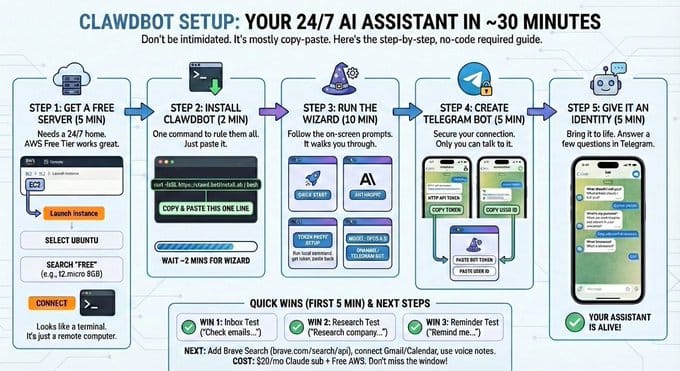
Step 1: Get a Server (5 min)
Choose your platform:
- Cloudflare Workers — Recommended for most users
- AWS Free Tier — t3.small minimum, m7i-flex.large recommended
- DigitalOcean/Hetzner — $6-12/mo VPS options
- Local machine — Mac Mini or any always-on computer
Step 2: Install OpenClaw (2 min)
One-liner installation:
curl -fsSL https://openclaw.ai/install.sh | bash
Or via npm:
npm i -g openclaw
Step 3: Run the Wizard (10 min)
The installer walks you through:
- API token setup (Claude/Anthropic)
- Telegram bot creation
- Initial configuration
Step 4: Create Telegram Bot (5 min)
- Message
@BotFatheron Telegram - Send
/newbotand follow the prompts - Copy the bot token into OpenClaw config
- Get your User ID (message
@userinfobot)
Step 5: Test It (5 min)
Verify your setup with these quick wins:
- Inbox Test: "Check my emails"
- Research Test: "Research company X"
- Reminder Test: "Remind me to call Mom at 5pm"
Total cost: ~$20/mo Claude subscription + $0-12/mo hosting
Security Hardening (Critical)
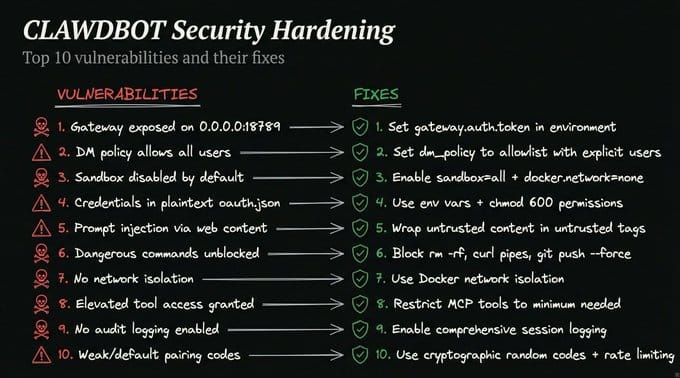
OpenClaw has system-level access to your machine. This is what makes it powerful — and dangerous if misconfigured.
The default configuration is not secure. Fix these issues before exposing your instance to the internet.
Top 10 Vulnerabilities and Fixes
| # | Vulnerability | Fix |
|---|---|---|
| 1 | Gateway exposed on 0.0.0.0:18789 |
Set gateway.auth.token in environment |
| 2 | DM policy allows all users | Set dm_policy to allowlist with explicit users |
| 3 | Sandbox disabled by default | Enable sandbox=all + docker.network=none |
| 4 | Credentials in plaintext oauth.json |
Use env vars + chmod 600 permissions |
| 5 | Prompt injection via web content | Wrap untrusted content in untrusted tags |
| 6 | Dangerous commands unblocked | Block rm -rf, curl pipes, git push --force |
| 7 | No network isolation | Use Docker network isolation |
| 8 | Elevated tool access granted | Restrict MCP tools to minimum needed |
| 9 | No audit logging enabled | Enable comprehensive session logging |
| 10 | Weak/default pairing codes | Use cryptographic random codes + rate limiting |
The Golden Rule
Never expose port 18789 to the internet without authentication.
If someone finds your gateway, they can instruct your AI to do anything you've given it access to — read your email, send messages as you, delete files, access your accounts.
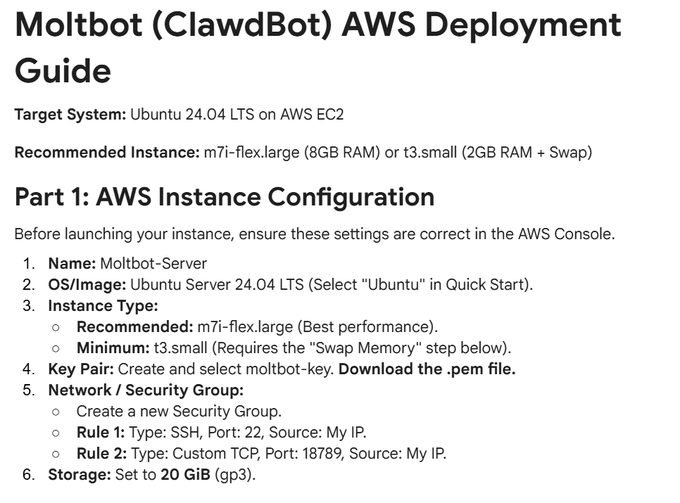
AWS Security Group Configuration
If deploying to EC2:
- Rule 1: SSH, Port 22, Source: My IP
- Rule 2: Gateway, Port 18789, Source: My IP
- Storage: 20 GiB gp3
Command Reference
S-Tier: Daily Drivers
| Command | Purpose |
|---|---|
/new |
Fresh conversation, same memory |
/compact |
Squeeze context when bloated |
/usage |
Check token burn rate |
A-Tier: Power User
| Command | Purpose |
|---|---|
/think high |
Deep reasoning mode |
/think off |
Speed mode for quick tasks |
/stop |
Kill a runaway response |
/subagents |
Manage background workers |
B-Tier: Situational
| Command | Purpose |
|---|---|
/model |
Switch models mid-chat |
/status |
Health check |
/reasoning |
Watch thinking in real-time |
/tts |
Voice replies |
C-Tier: Set and Forget
| Command | Purpose |
|---|---|
/config |
One-time setup |
/activation |
Group mention settings |
/whoami |
Get your user ID |
/reset |
Nuclear option |
Useful Combos
- Daily driver:
/usage→/compact→ continue working - When it gets slow:
/new— fresh start, instant fix - Deep work:
/think high→ do the task →/think off - When it won't shut up:
/stop→/compact→ retry - Background grind: spawn subagent →
/subagentsto monitor
Tips & Tricks from Power Users
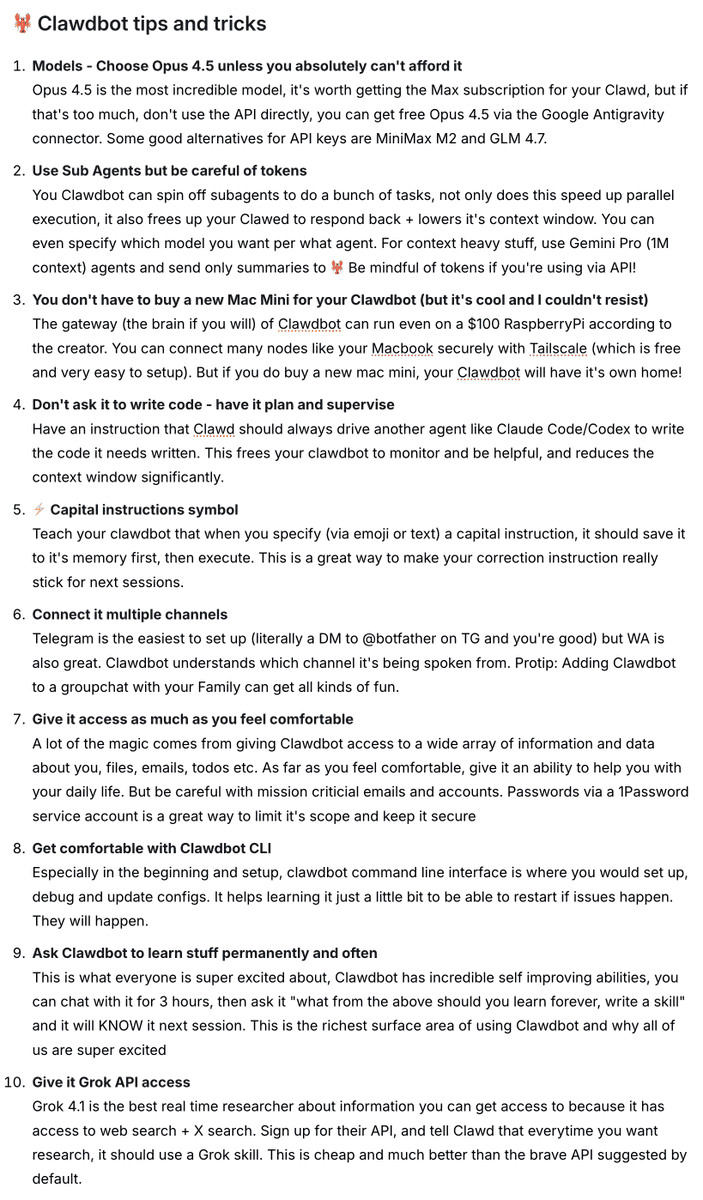
1. Choose Opus 4.5 if budget allows
The Max subscription is worth it for complex tasks. The quality difference is noticeable, especially for multi-step reasoning and code generation.
Budget alternatives: MiniMax M2, GLM 4.7, or free Opus 4.5 via Google Antigravity connector.
2. Use subagents for parallel execution
Spin off subagents for batch tasks. Your main agent stays responsive while background workers handle heavy lifting.
Pro tip: Use Gemini Pro (1M context) for context-heavy work, send only summaries back to the main agent.
3. You don't need a Mac Mini
The gateway runs on a $100 Raspberry Pi. Connect multiple nodes via Tailscale for a distributed setup where your laptop, desktop, and Pi all work together.
4. Have it plan and supervise, not write code
For coding tasks, instruct OpenClaw to drive Claude Code or Codex rather than writing code directly. This frees your bot to monitor progress and reduces context consumption.
5. Use a capital instruction symbol
Teach it: when you use a CAPITAL instruction (via emoji or text), save it to memory first, then execute. Makes corrections stick across sessions.
Example: "IMPORTANT: Always draft emails for my review before sending."
6. Connect multiple channels
Telegram is easiest (DM @botfather). WhatsApp works too. Pro tip: add it to a family group chat and let everyone interact with it.
7. Give it access incrementally
The magic comes from access to emails, files, and todos. But start small and expand as you build trust. Use a 1Password service account for sensitive credentials — it limits the blast radius.
8. Learn the CLI early
The command line interface is essential for setup, debugging, and config updates. When something goes wrong (and it will), CLI knowledge saves hours.
9. Ask it to learn permanently
After a productive session, ask: "What from above should you learn forever? Write a skill."
This is the richest surface area of OpenClaw — it literally gets smarter the more you use it.
10. Add Grok API for research
Grok 4.1 has real-time web search plus X/Twitter search. Better than Brave API for current events and social research. Cheap and effective.
Prompting Best Practices
OpenClaw is autonomous — it acts rather than just drafts. This requires different prompting habits than ChatGPT.
Be Explicit and Prescriptive
The biggest mistake new users make: treating OpenClaw like a chatbot. It's not. It's an agent with real capabilities.
-
Bad: "Email the team about the meeting"
-
Good: "Draft an email for my review to the team about the meeting"
-
Bad: "Clean up my downloads folder"
-
Good: "Show me what's in my downloads folder. Before deleting anything, ask for my approval."
Guard Against Persona Missteps
OpenClaw tends to act as you rather than as your assistant. Without explicit instruction, it might send emails that sound like they came from you, not from an AI acting on your behalf.
Fix: Explicitly instruct: "Your role is to act as my AI assistant. Identify yourself as such in communications. Do not impersonate me."
Handle Complex Tasks via Iteration
Break complex instructions into smaller prompts rather than one large command. The AI handles sequential tasks better than parallel complexity.
Tip: Use "Think step-by-step" to improve accuracy on complex actions.
Skills & Extensions
The skill ecosystem is what transforms OpenClaw from a toy into a tool.
Installing Skills
Via CLI:
npx clawdhub@latest install <skill-slug>
Manual installation — copy skill folders to:
- Global:
~/.openclaw/skills/ - Workspace:
<project>/skills/
Popular Skill Categories
The community has built 700+ skills across 28 categories:
- DevOps & Cloud (41) — Azure, Cloudflare, Kubernetes, Docker
- Productivity (41) — Task management, scheduling
- Notes & PKM (44) — Notion, Obsidian, Logseq
- Marketing & Sales (42) — CRM, outreach, analytics
- AI & LLMs (38) — Model orchestration, prompts
- Search & Research (23) — Brave, Tavily, Kagi
- Browser Automation (11) — Playwright, headless browsers
- Apple Apps (14) — Music, Photos, Mail, Find My
- Finance (29) — Banking, crypto, budgeting
- Smart Home (31) — HomeKit, IoT control
Full catalog: github.com/VoltAgent/awesome-openclaw-skills
Deployment Options Compared
| Platform | Setup Time | Monthly Cost | Maintenance | Best For |
|---|---|---|---|---|
| Cloudflare Workers | 5 min | $5 | None | Most users |
| VPS (DO/Hetzner) | 30+ min | $6-12 | Required | Power users |
| Local Machine | 15 min | $0 | Minimal | Dev/Testing |
| Mac Mini | 30 min | $0 | Minimal | Always-on home |
Which Should You Choose?
Cloudflare if you want the fastest setup with zero maintenance. It just works.
VPS if you need more control, custom domains, or want to run additional services alongside OpenClaw.
Local if you're privacy-maximalist or want to tinker. Also good for development and testing.
Mac Mini if you want it running 24/7 at home with all your local files accessible.
AWS EC2 Quick Config
- OS: Ubuntu Server 24.04 LTS
- Instance: m7i-flex.large (8GB) or t3.small (2GB + swap)
- Storage: 20 GiB gp3
- Security: SSH (22) + Gateway (18789) from My IP only
Resources
- Official site: openclaw.ai
- Skills registry: clawhub.ai
- Community guide: moltbot.guru
- Skills collection: github.com/VoltAgent/awesome-openclaw-skills
Naming History
The project has been renamed twice due to trademark concerns:
- Clawdbot → Moltbot → OpenClaw (current)
If you see references to Clawdbot or Moltbot online, they're talking about the same project.
Key Warnings
Before you dive in, understand what you're enabling:
-
OpenClaw has system-level access — It can read files, execute commands, and send emails as you. This is the point, but it's also the risk.
-
Secure the gateway — Never expose
0.0.0.0:18789without authentication. This is the most common mistake and the most dangerous. -
Review actions in draft mode — Especially for email, payments, and deletions. Train it to ask before acting on anything irreversible.
-
Set spending limits — AI API costs can surprise you. Set limits before they do.
-
Backup before granting access — Especially to important accounts. Start with low-stakes integrations and expand as you build trust.
-
It learns and remembers — Be intentional about what you teach it. Bad habits persist just like good ones.
Final Thoughts
OpenClaw represents a shift in how we interact with AI. Instead of visiting a website to ask questions, you have an agent that lives in your infrastructure, knows your context, and takes action on your behalf.
It's not for everyone. The setup requires some technical comfort. The security responsibilities are real. And the temptation to over-automate can backfire.
But for those willing to invest the time, it's transformative. Having an AI that actually knows you — your files, your calendar, your communication style — changes what's possible.
The future isn't about smarter chatbots. It's about AI agents that do things. OpenClaw is one of the first to get it right.
Last updated: January 2025